
AI agents are autonomous software programs that handle multi-step business tasks without constant human input. Freelancers using AI agents reclaim 6–10 hours per week and report average revenue increases of 340%. That is not a marginal efficiency gain. It is the difference between running a solo practice and running a scalable business. The best ai agents freelance productivity examples cover onboarding, lead discovery, client communication, and billing. Each of these areas compounds: automate one, and the others get easier. This article breaks down exactly where AI agents deliver the most measurable results for freelancers in 2026.
1. AI agents freelance productivity examples: what they actually automate
AI agents are best understood as autonomous workers assigned to a single operational layer. They are not general-purpose chatbots. A well-configured agent monitors a job board, scores new listings, drafts a proposal, and routes it for your approval. All of that happens while you are doing billable work.
The most productive freelancers treat AI agents the way a growing firm treats junior staff. Repetitive operational tasks like data entry, follow-up emails, and status reports go to agents. High-judgment work stays with you. That division is what makes the productivity gains real and sustainable.

The six task categories where agents deliver the clearest ROI are client onboarding, lead scoring, proposal drafting, project status updates, invoice management, and contract processing. Each one has a measurable time cost before automation and a dramatically lower cost after.
2. Automating client onboarding to cut admin time
Client onboarding is the single most time-consuming administrative task for most freelancers. Without automation, a new client intake runs 6–8 hours of back-and-forth emails, contract reviews, and setup calls. Automated onboarding cuts that to under 20 minutes of review time per client.
A well-built onboarding agent handles the full sequence automatically:
- Sends a branded welcome message within minutes of contract signing
- Delivers an intake form to capture project details, brand assets, and access credentials
- Books a kickoff call via a scheduling link
- Creates a project folder and populates it with the client's submitted information
- Triggers a confirmation email with next steps
The agent connects these steps through API triggers and a large language model (LLM) that personalizes each message. Client satisfaction scores improve measurably after this kind of automation. One documented case shows scores rising from 7.2 to 8.9 out of 10 after onboarding workflow automation. That improvement comes from speed and consistency, not from more human effort.
Pro Tip: Build your onboarding agent before you need it. Set it up during a slow week, test it with one client, and refine the intake form. The whole implementation takes one afternoon.
3. Lead scoring and proposal drafting at scale
Manual lead discovery costs freelancers 2–4 hours every day. Most of that time is noise: listings with mismatched budgets, vague scopes, or clients who have already hired. An AI agent running keyword matching and budget signal filters cuts that search to under 10 minutes of daily review.
The agent monitors job boards continuously, scores each listing against your defined criteria, and surfaces only the top matches. Lead filtering removes up to 90% of irrelevant listings before you ever see them. That means the 10 minutes you spend reviewing are genuinely productive.
The proposal drafting step follows directly. Once a lead clears the scoring threshold, the agent pulls the job description, matches it against your portfolio and service offerings, and drafts a tailored proposal. Freelancers using this workflow send 8–12 proposals per week compared to 3–5 without automation. More proposals sent means more contracts won, at the same hourly investment.
- Agent monitors 5–10 job boards simultaneously
- Scores listings by keyword match, budget range, and project type
- Drafts proposals using your tone, past wins, and service descriptions
- Routes each draft to your inbox for a final read before sending
Pro Tip: Always keep a human review gate before any proposal goes out. The agent drafts; you approve. This protects your voice and catches any mismatches the agent missed.
4. Project status updates, communication, and invoicing
Ongoing client communication is where many freelancers quietly lose hours every week. Writing status updates, chasing invoice payments, and answering routine questions each take small chunks of time that add up fast. AI agents handle all three.
A status update agent connects to your task tracker, reads completed and in-progress items, and generates a plain-language weekly summary for each client. This alone saves 2.5 hours per week on updates. Clients get consistent, professional communication without you writing a single word.
Invoice management follows the same pattern:
- Agent generates an invoice when a project milestone is marked complete
- Sends the invoice to the client automatically
- Sends a polite reminder at day 7 if unpaid
- Escalates with a firmer follow-up at day 14
- Flags the account for your personal attention at day 21
This removes the awkwardness of chasing payments manually. It also removes the risk of forgetting. Automated invoice reminders recover revenue that freelancers routinely leave uncollected simply because follow-up feels uncomfortable.
Pro Tip: Personalize your invoice reminder templates once, then let the agent run them. A warm, professional tone in the day-7 reminder converts faster than a generic "payment overdue" notice.
5. Specialized agents versus all-in-one approaches
The most common mistake freelancers make when deploying AI agents is trying to build one agent that does everything. Multi-agent systems with narrowly focused roles consistently outperform single monolithic agents on quality and reliability.
The logic is straightforward. An agent trained and prompted for one task, such as lead scoring, performs that task better than a general agent splitting attention across ten functions. Chaining specialized agents together through a connective platform produces a workflow that is both more accurate and easier to debug.
| Approach | Strengths | Best for |
|---|---|---|
| Specialized single-task agents | High accuracy, easy to test and fix | Freelancers with defined, repeating workflows |
| All-in-one agent platforms | Faster initial setup, fewer integrations | Freelancers just starting with automation |
| Multi-agent chains | Best output quality, modular and scalable | Freelancers managing 10+ concurrent clients |
Connective platforms like Zapier and n8n serve as the glue between agents, passing data from one step to the next without manual handoffs. Operational bottlenecks often hide in those handoffs. A clean automation layer between agents is what separates a workflow that runs reliably from one that breaks under load.
Start with the task that costs you the most time each week. Build one agent for it, test it for two weeks, then add the next. This incremental approach keeps the system manageable and lets you measure the ROI of each addition clearly.
6. Scaling from 4 clients to 20 without extra hours
The productivity ceiling for a solo freelancer without automation sits at roughly 3–4 concurrent clients. Beyond that, admin work crowds out billable hours. AI agents remove that ceiling. Freelancers who automate their operational layer scale to 15–20 concurrent clients without adding working hours.
That capacity increase translates directly to revenue. The same 340% average revenue increase cited earlier reflects not just more clients, but better clients. When you stop spending four hours a day on admin, you have time to pursue higher-value work and build stronger client relationships.
The financial case for automation is also clear on the cost side. Replacing manual administrative support with AI agents saves $12,000–$48,000 annually compared to hiring a human assistant. For a solo freelancer, that is a significant margin improvement.
The threshold for justifying the setup investment is simple. If you spend more than 8 hours per week on administrative tasks, the ROI on AI agent setup pays back within a month. Most freelancers hit that threshold without realizing it because the time is spread across dozens of small tasks.
7. Tracking your "invisible second job" before automating
The most underrated step in freelance workflow optimization is measurement before automation. Most freelancers underestimate their admin burden because it is fragmented across email, invoicing, scheduling, and project management tools. Tracking unbilled operational work first reveals where agents will have the highest impact.
Spend one week logging every non-billable task and its duration. Group them by category: communication, admin, prospecting, and billing. The category with the highest total hours is your first automation target. This approach removes guesswork and ensures you build agents that solve real problems rather than theoretical ones.
Start with monitoring tasks before content creation tasks. Automating a job board monitor carries almost no risk. The agent surfaces leads; you decide which ones to pursue. Automating proposal drafting carries more risk and benefits from the monitoring layer already being in place.
Key Takeaways
AI agents deliver the highest freelance productivity gains when deployed on specific, repeating operational tasks with a human review gate at each output stage.
| Point | Details |
|---|---|
| Onboarding automation | Cuts new client setup from 6–8 hours to under 20 minutes of review time. |
| Lead scoring agents | Reduce daily prospecting from 2–4 hours to under 10 minutes of review. |
| Multi-agent chains | Outperform single all-in-one agents on accuracy and reliability. |
| Scaling capacity | Freelancers reach 15–20 concurrent clients without adding working hours. |
| Measure first | Track unbilled hours for one week before building any agent to find the highest-ROI target. |
What I have actually learned from running AI agents as a freelancer
The productivity numbers are real, but the path to getting them is not as clean as most articles suggest. My honest experience is that the first agent you build will be wrong. Not broken, just misaligned with how your actual workflow runs. You will discover that your intake form asks the wrong questions, or that your proposal template does not match how you actually pitch. That is not a failure. It is the most useful feedback you will get.
The freelancers I have seen struggle with AI agents share one pattern: they try to automate everything at once. They build a complex multi-agent system before they understand their own workflow well enough to describe it clearly. The agents then reflect all the ambiguity and inconsistency in the underlying process.
Start with one agent on one task. Run it for two weeks. Measure the time saved. Then decide whether to expand. The compounding effect is real, but it only works if each layer is solid before you add the next one.
The other thing I would push back on is the idea that AI agents replace judgment. They do not. The best setup I have seen treats agents as a filter and a first draft. The freelancer still makes every consequential decision. That human-in-the-loop structure is not a limitation. It is what keeps client trust intact while the automation handles the volume.
— Ben
Agentcohort: one place to run all your agents
Managing multiple AI agents across separate tools creates the same fragmentation problem you were trying to solve. Agentcohort brings Claude Code, OpenAI Codex, and other agents into a single multi-terminal workspace where each project runs in its own dedicated environment.
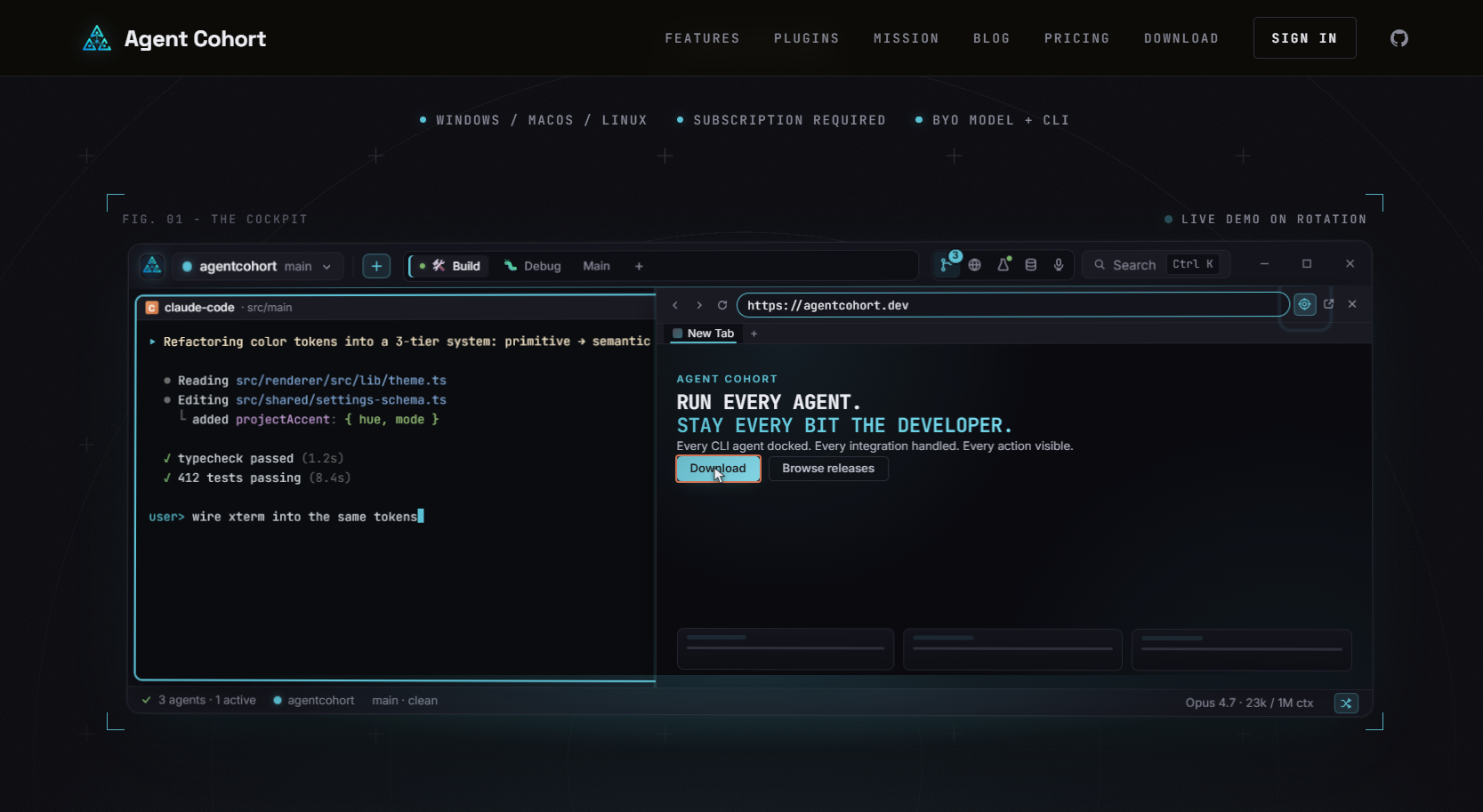
Every agent session persists, so you pick up exactly where you left off. Installations and authentication run automatically, which means setup overhead disappears. Freelancers who want to run a lead scoring agent, an onboarding agent, and a billing agent simultaneously can do that from one screen without switching tools or losing context. Agentcohort is built for exactly the kind of multi-agent, high-volume workflow this article describes.
FAQ
What are AI agents for freelancers?
AI agents are autonomous software programs that complete multi-step tasks without constant human input. For freelancers, common examples include lead scoring, client onboarding, proposal drafting, and invoice follow-up.
How much time can AI agents save a freelancer each week?
Freelancers using AI agents report reclaiming 6–10 hours per week by automating administrative tasks like status updates, invoicing, and client intake.
Should I use one AI agent or multiple specialized agents?
Multi-agent systems with narrowly focused roles produce better results than a single all-in-one agent. Each specialized agent handles one task well, and a connective platform like Zapier or n8n links the steps together.
How do AI agents help with client onboarding?
An onboarding agent sends welcome messages, delivers intake forms, books kickoff calls, and creates project folders automatically after a contract is signed, cutting setup time from hours to minutes.
When does the investment in AI agents pay off for a freelancer?
If you spend more than 8 hours per week on non-billable administrative work, the setup investment in AI agents typically pays back within one month through recovered time and increased client capacity.