
A shared developer workspace configuration is a centralized, versioned environment setup that development teams and freelancers use to collaborate on software projects without environment drift. The industry term for this practice is Configuration as Code (CaC), and it covers everything from IDE settings and dependency versions to container definitions and environment variables. Teams that skip this setup spend hours debugging "it works on my machine" failures instead of shipping code. This guide covers the core concepts, setup types, practical configuration steps, and best practices for maintaining a consistent collaborative development environment in 2026.
What is a shared developer workspace configuration?
A shared developer workspace is a defined, reproducible environment that every team member runs identically, regardless of their local machine. The configuration includes the operating system layer, runtime versions, installed packages, IDE extensions, and environment variables. When these settings are codified and stored in version control, the entire team pulls the same environment on demand.
The core problem this solves is environment drift. A developer installs a slightly different Node.js version, a freelancer uses a different Python path, and suddenly a bug appears that no one else can reproduce. Manual local machine consistency is error-prone and leads to exactly these drift issues. Codifying the environment removes the human variable entirely.
Three techniques form the foundation of any shared workspace setup:
- Devcontainers: A
.devcontainer/devcontainer.jsonfile defines the container image, extensions, and post-create commands. Every developer opens the same container. - Configuration as Code (CaC): IDE settings, linters, formatters, and environment variables are stored in git alongside the source code.
- Cloud Development Environments (CDEs): The entire workspace runs in the cloud, so provisioning is instant and environment parity is guaranteed by default.
Teams that adopt these techniques report faster onboarding, fewer environment-related bugs, and consistent tooling across every contributor. A new developer clones the repo and has a working environment in minutes, not days.
Types of developer workspace setups and terminal configurations
Development teams use several distinct workspace models, and choosing the right one depends on team size, project complexity, and how developers prefer to organize their focus.

Single workspace per project is the most common starting point. One shared configuration covers the entire project. This works well for small teams with a single tech stack. The risk is that frontend and backend developers end up with tools the other side never uses, which bloats the container image.
Role-based workspaces solve that problem by splitting configurations by discipline. A frontend workspace includes Node.js, ESLint, and browser testing tools. A backend workspace includes the database client, API testing tools, and server runtimes. A DevOps workspace includes Terraform, kubectl, and cloud CLI tools. Each role gets exactly what it needs, nothing more.
Workspace-per-branch is the most advanced pattern. The workspace-per-branch approach lets developers maintain multiple contexts simultaneously without rebuilds or reinstalls. Each feature branch lives in its own directory or git worktree. Switching branches means switching workspaces, not waiting for a clean install.
Terminal organization matters just as much as the workspace model. Role-based terminal layouts minimize cognitive load by saving and restoring tab layouts, split panes, and running sessions. A developer working on three microservices can open three terminal panes, each scoped to its own service, without losing context when switching tasks.
Pro Tip: Version-control your terminal layout files alongside your devcontainer config. When a new team member joins, they get the same terminal setup as everyone else, not just the same code environment.
The right workspace model is not one-size-fits-all. A freelancer juggling five client projects benefits most from workspace-per-project isolation. A 20-person product team benefits most from role-based configurations with a shared base image.
How to configure shared developer workspaces
Setting up a shared workspace configuration requires three prerequisites: a version control system (Git), a container runtime (Docker), and an IDE that supports devcontainers (VS Code or JetBrains IDEs both do).
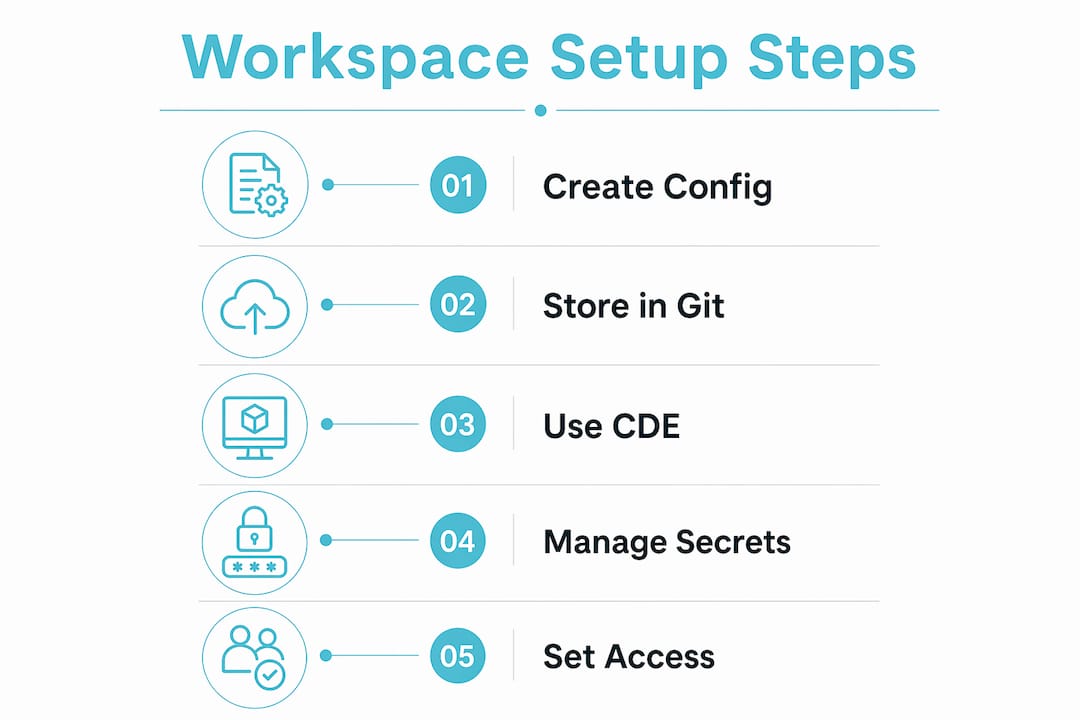
Step 1: Create the devcontainer configuration.
Add a .devcontainer/devcontainer.json file to the root of your repository. This file specifies the base Docker image, VS Code extensions to install, and any post-create scripts. A minimal example points to a Node.js base image and installs ESLint and Prettier extensions automatically.
Step 2: Store all environment settings in git.
Codified environment files stored in git mean all team members use identical dependencies and tooling. This includes .editorconfig, .nvmrc, pyproject.toml, and any linter config files. Never rely on developers to configure these manually.
Step 3: Use a cloud development environment for instant provisioning. CDEs reduce setup time from hours to seconds and deliver 100% environment parity across the team. A developer clicks a button, and a fully configured workspace spins up in the cloud. No local Docker installation required, no version conflicts with other projects on the same machine.
Step 4: Manage secrets with a dedicated secrets manager. Never store API keys or credentials in the devcontainer config. Use a secrets manager like HashiCorp Vault or AWS Secrets Manager, and inject secrets at runtime through environment variables. The devcontainer config references the variable name, not the value.
Step 5: Set role-based access controls. Cloud-based workspaces can be tied to clusters aligned by region, security level, or business unit. Assign workspace templates by role so a junior developer cannot access production credentials, and a contractor cannot see internal infrastructure configs.
| Configuration method | Provisioning speed | Environment parity | Local resource use |
|---|---|---|---|
| Local devcontainers | Minutes | High | High |
| Cloud IDEs (CDEs) | Seconds | Guaranteed | None |
| Bare metal setup | Hours | Low | High |
| Hybrid (local + cloud sync) | Minutes | Medium | Medium |
Pro Tip: Pin your base Docker image to a specific digest, not just a tag like latest. Tags change silently. A digest guarantees every developer pulls the exact same image bytes.
Troubleshooting and best practices for shared workspace configurations
Configuration drift is the most common failure mode in shared workspaces. It happens when one developer updates a dependency locally and does not commit the change to the shared config. The fix is a policy: no environment change is valid unless it is committed to the devcontainer config and reviewed in a pull request.
Common pitfalls and how to address them:
- Resource contention in cloud workspaces: Set CPU and memory limits per workspace template. Without limits, one developer running a heavy build can degrade performance for the entire team.
- Backward compatibility breaks: When updating a base image or runtime version, create a new workspace template version rather than overwriting the existing one. Let teams migrate on their own schedule.
- Secret sprawl: Audit environment variable usage quarterly. Unused secrets left in configs create unnecessary security exposure.
- Onboarding gaps: Treat the devcontainer config as living documentation. Add comments explaining why specific versions are pinned or why certain extensions are included.
Secure developer spaces balance developer freedom with centralized IT governance, enabling self-serve environment provisioning while enforcing corporate policy. Such environments provision in seconds and reduce IT bottlenecks without sacrificing security or observability.
Workspace managers that save and load complex layouts reduce cognitive load and save time when switching between project contexts. Top teams version-control their terminal session states, including tabs, panes, and agent contexts, so restoring a full working environment takes seconds after a machine restart or workspace migration.
Continuous refinement matters. Collect feedback from the team after every major project milestone. Ask which tools are missing, which are never used, and which config steps caused confusion during onboarding. Iterate the workspace template based on that feedback, then tag the new version in git.
What tools support shared developer workspace configurations?
The tooling ecosystem for shared workspace setup falls into four clear categories.
Containerization tools form the base layer. Docker provides the container runtime. The devcontainer specification, maintained by Microsoft, defines the .devcontainer/devcontainer.json standard that VS Code, JetBrains, and GitHub Codespaces all support. These tools are free and widely adopted.
Cloud development platforms sit on top of containerization. They handle provisioning, networking, and storage so teams do not manage infrastructure manually. The key differentiator between platforms is how quickly they spin up a workspace and whether they support custom base images.
Terminal and workspace managers handle the session layer. Tools like tmux and Zellij save terminal layouts and restore sessions after disconnects. Advanced workspace managers save multiple windows, split panes, and running applications, which cuts downtime when switching between projects.
Configuration management via git ties everything together. Storing workspace configs in the same repository as the application code means every environment change goes through code review. Teams can roll back a broken workspace config the same way they roll back a broken feature.
Agentcohort takes this further by integrating AI agents, including Claude Code and OpenAI Codex, directly into a multi-terminal grid workspace. Each project gets its own dedicated environment with session persistence and customizable layouts, so teams manage both their code and their AI agents from a single interface.
Key Takeaways
Effective shared developer workspace configuration requires codified environments, version-controlled configs, and a clear workspace model matched to team size and project complexity.
| Point | Details |
|---|---|
| Codify everything in git | Store devcontainer configs, IDE settings, and environment variables in version control for full reproducibility. |
| Match workspace model to team size | Use role-based or workspace-per-branch patterns for larger teams; single-project configs work for small teams. |
| CDEs guarantee parity | Cloud development environments provision in seconds and eliminate local machine inconsistencies entirely. |
| Secure with role-based access | Assign workspace templates by role to enforce access controls without blocking developer productivity. |
| Iterate workspace templates | Collect team feedback after each project milestone and update the shared config based on real usage. |
Why I think most teams configure shared workspaces backwards
Most teams I have seen treat the workspace config as an afterthought. They build the application first, then scramble to document the setup when the third developer joins and cannot get the project running. That backwards approach costs far more time than setting up a devcontainer on day one.
The shift that actually changes team velocity is treating the workspace config as a first-class artifact, not a README footnote. When the environment is codified and versioned, onboarding a new contributor takes the same effort as reviewing a pull request. That is a fundamentally different relationship with your own tooling.
Cloud-based workspaces accelerate this further. I have watched teams cut their onboarding time from two days to under an hour by moving from local Docker setups to cloud IDEs. The cognitive load reduction is real. Developers stop thinking about their machine and start thinking about the problem.
The next frontier is integrating AI agents into the workspace layer itself. Running Claude Code or OpenAI Codex in isolated, project-scoped terminals means the agent operates in the same environment as the developer. There are no version mismatches, no missing dependencies, and no guessing about what the agent can access. That level of environment control is where workspace configuration is heading in 2026.
My honest recommendation: start with a devcontainer config today, even if it is minimal. Pin your runtime version, add your linter config, and commit it. You can build from there. The teams that wait for the "perfect" setup never ship one.
— Ben
Agentcohort and the multi-terminal workspace approach
Development teams that manage multiple AI agents alongside their code face a specific problem: fragmented tool usage across disconnected terminal windows.
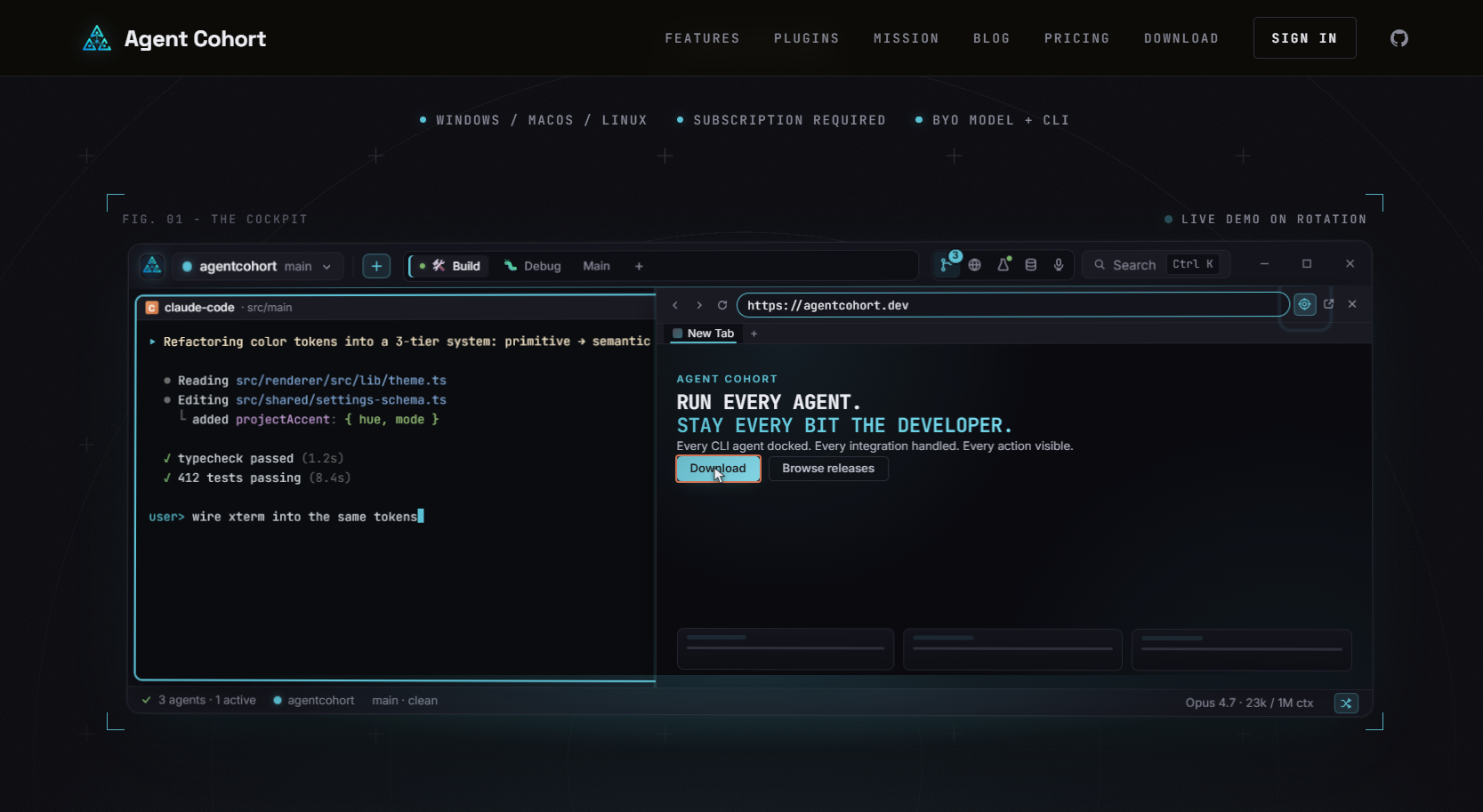
Agentcohort addresses this with a multi-terminal grid workspace where each project gets its own dedicated environment. Claude Code and OpenAI Codex run in isolated terminals with session persistence, so agents never lose context between sessions. Setup steps like installations and authentication are handled automatically, so teams focus on the project rather than the environment. Customizable layouts mean each team member configures their grid to match their workflow, not a default template.
FAQ
What is a shared developer workspace?
A shared developer workspace is a versioned, reproducible environment that every team member runs identically, defined through tools like devcontainers and Configuration as Code stored in git.
How do CDEs differ from local devcontainers?
Cloud development environments provision in seconds with guaranteed environment parity and zero local resource use, while local devcontainers require Docker installed on each machine and take minutes to build.
What is the workspace-per-branch pattern?
The workspace-per-branch pattern assigns each feature branch its own isolated directory or git worktree, letting developers switch contexts without rebuilds or dirty working tree conflicts.
How do teams prevent configuration drift?
Teams prevent configuration drift by requiring all environment changes to go through a pull request against the shared devcontainer config, so no local-only changes survive a code review.
What security controls apply to shared workspace configurations?
Role-based access controls tied to workspace templates restrict which credentials and infrastructure configs each developer can access, balancing self-serve productivity with centralized IT governance.