
A team coding environment checklist is a practical framework listing the essential components and best practices for establishing efficient, collaborative software development workflows. Without one, teams fall into the "works on my machine" trap, where inconsistent runtimes, missing dependencies, and conflicting linter rules slow every sprint. The most effective checklist balances rigorous environment standardization with developer autonomy, covering everything from runtime version pinning and branching policies to cloud IDE selection and AI agent governance. This guide walks through each layer of a complete development environment setup, built for 2026 realities.
1. What belongs on a team coding environment checklist
The core of any software development checklist separates team-wide standards from individual preferences. Team standards are non-negotiable: runtime versions, code formatting rules, secret handling policies, and branching conventions. Personal preferences, such as editor themes, keybindings, and shell aliases, live outside the canonical config layer.
Every checklist should cover these foundational items:
- Runtime version pinning: Use
.nvmrc,.python-version, or equivalent files so every developer runs the same interpreter. - Code formatting: Enforce a single formatter (Prettier for JavaScript, Black for Python) via config files committed to the repository.
- Linting rules: Shared ESLint, Flake8, or Rubocop configs prevent style debates in code review.
- Secret handling: No credentials in source code. Require
.envfiles in.gitignoreand document the secrets manager in use. - Branching policy: Define naming conventions (
feature/,fix/,release/) and pull request size expectations upfront. - Pre-commit hooks: Use Husky or pre-commit to run formatters and linters before code reaches the remote.
Separating core standards from personal preferences via a base-layer approach reduces onboarding friction and eliminates the most common source of environment bugs. Automated enforcement through containers or scripts handles the base layer without restricting what developers do on top.
Pro Tip: Commit a Makefile or justfile with targets like make setup and make lint so new developers can bootstrap the environment in one command.

2. Which cloud development environments teams should consider
Ecosystem alignment is the single most important factor when choosing a cloud development environment (CDE). A team already deep in GitHub gets far more value from GitHub Codespaces than from a platform with better raw specs but weaker GitHub integration.
The three leading options in 2026 each serve a different profile:
- GitHub Codespaces: Best for GitHub-native teams. Offers 60–120 free core hours per month and tight integration with GitHub Copilot. Spins up a full VS Code environment in the browser or desktop app within seconds.
- Gitpod: Best for teams using multiple Git providers (GitHub, GitLab, Bitbucket) or preferring JetBrains IDEs. Provides 50 free hours per month and supports self-hosted deployment for teams with strict data residency requirements.
- DevPod: Best for cost-conscious teams that want full infrastructure control. It is fully open source, runs on any cloud or local machine, and has no vendor lock-in.
| Feature | GitHub Codespaces | Gitpod | DevPod |
|---|---|---|---|
| Free tier | 60–120 core hours/month | 50 hours/month | Free, open source |
| Git provider support | GitHub only | GitHub, GitLab, Bitbucket | Any |
| IDE compatibility | VS Code | VS Code, JetBrains | VS Code, JetBrains |
| Self-hosted option | No | Yes | Yes |
| AI assistant built in | GitHub Copilot | Configurable | Configurable |
GitHub Codespaces suits GitHub-native teams; Gitpod fits multi-provider workflows; DevPod wins on cost and control. Your team coding environment comparison should start with which Git provider you already use, not which platform has the most features.
AI coding assistant integration is a separate decision. Claude Code, GitHub Copilot Workspaces, and Cursor each bring different strengths. Claude Code excels at multi-file reasoning. GitHub Copilot Workspaces integrates directly into GitHub issues and pull requests. Cursor adds a chat-first interface on top of VS Code. Choose based on where your team already spends its time.
3. How often teams should audit their coding environment
Teams should review platform health at least quarterly, or during major workflow shifts such as a new hire wave or a significant architecture change. Skipping audits leads to platform sprawl: orphaned repositories, stale CI pipelines, and access permissions that outlive the employees who needed them.
A complete audit covers five pillars:
- Repository workflows: Check branch protection rules, required reviewers, and merge strategies. Confirm that stale branches are deleted automatically.
- Build and release automation: Verify that CI/CD pipelines still reflect the current deployment target. Remove jobs that no longer run or that duplicate work.
- Hosting and runtime: Confirm that runtime versions in production match the versions pinned in the repository. Flag any drift.
- Observability: Check that error tracking, logging, and alerting are connected and that alerts route to the right people.
- Access governance: Audit who has write access to production systems. Remove access for former team members and contractors.
Checklist reviews should be living documents owned by named team members, not filed away after a single pass. Assign each pillar to a specific person so accountability is clear.
Pro Tip: Tie your audit cadence to sprint planning or onboarding events. Running an audit when a new engineer joins forces you to document what actually exists, not what you think exists.
4. How to integrate AI agents securely into your team environment
AI agent orchestration is essential in 2026, not a nice-to-have. The primary tool profiles are Claude Code, GitHub Copilot Workspaces, and Cursor. Each operates differently, and mixing them without governance creates credential sprawl and unpredictable side effects.
The biggest security risk with persistent AI agents is credential persistence. An agent that retains access tokens between sessions can act on stale permissions or expose secrets if the session is compromised. Ephemeral, disposable environments solve this directly. The agent spins up, completes its task, and the environment is destroyed. No credentials persist.
Best practices for AI agent orchestration in a team environment:
- Use ephemeral containers for every agent task. Spin up, complete, destroy. Never let an agent session persist overnight.
- Limit agent permissions to the minimum required. Define the "blast radius" before the agent runs, not after something goes wrong.
- Audit agent actions in logs. Every file write, API call, and shell command should be logged and reviewable.
- Separate agent credentials from human credentials. Use dedicated service accounts with scoped tokens, not developer personal access tokens.
- Evaluate data residency before adopting any AI tool. Enterprise teams must confirm where code and prompts are stored and processed.
- Review AI tool security commitments before rollout. Understanding AI tool security practices is a prerequisite for enterprise adoption.
Enterprise teams need to evaluate data management strategies with every AI tool they adopt. A tool that sends code to an external server for processing may violate compliance requirements before a single line ships.
5. How to customize your checklist for your team's workflow
Standardized means consistent outputs, not identical tools. A team of ten engineers does not need to use the same editor. They do need to produce code that passes the same linter, deploys through the same pipeline, and follows the same branching convention.
The right customization starts with your collaboration style. Teams that work asynchronously across time zones need strong pull request workflows: detailed PR templates, required reviewers, and automated status checks that run without human intervention. Teams that co-locate or pair-program frequently benefit more from cloud-integrated, browser-based environments where sharing a session is one click away.
Consider startup time friction when adding tools to the checklist. A tool that takes 20 minutes to configure on a new machine will be skipped by half the team. Prefer tools that install via a single package manager command and configure via a committed dotfile. The lower the friction, the higher the adoption.
Two example scenarios show how customization works in practice. A fully remote startup with engineers across five time zones should prioritize GitHub Actions for CI, a PR review bot for async feedback, and Gitpod for reproducible cloud environments. A co-located agency team doing rapid client prototypes benefits more from GitHub Codespaces for instant spin-up and a shared Cursor workspace for live collaboration. The checklist items differ, but the goal is the same: consistent, reviewable output with minimal setup friction.
Pro Tip: Run a 30-minute "environment audit" with every new hire during their first week. Their fresh perspective will surface gaps that experienced team members stopped noticing months ago.
Key takeaways
A well-maintained team coding environment checklist is the single most effective way to reduce onboarding time, prevent environment drift, and govern AI agent usage safely across a development team.
| Point | Details |
|---|---|
| Separate standards from preferences | Pin runtimes and formatters at the team level; leave editor choices to individuals. |
| Match your CDE to your Git provider | GitHub Codespaces, Gitpod, and DevPod each serve a different team profile. |
| Audit at least quarterly | Review repository workflows, CI/CD, hosting, observability, and access every quarter. |
| Use ephemeral environments for AI agents | Spin-up-and-destroy containers prevent credential persistence and limit blast radius. |
| Customize for collaboration style | Async teams need strong PR workflows; co-located teams benefit from live cloud IDEs. |
What most teams get wrong about environment standardization
The biggest misconception I see is that "standardizing the environment" means forcing everyone onto the same editor and the same workflow. That interpretation kills developer satisfaction and drives your best engineers toward teams that give them more freedom.
What actually needs to be standard is the output layer: the linter config, the runtime version, the CI pipeline, the branching convention. Everything above that layer is fair game for personal preference. I have worked with teams that ran VS Code, Neovim, and JetBrains side by side with zero friction, because the formatter and the pre-commit hooks made the output indistinguishable.
The second mistake is treating the checklist as a one-time document. Teams that write a checklist during initial setup and never revisit it accumulate technical debt faster than teams with no checklist at all. The false sense of order is worse than acknowledged chaos. A checklist that gets reviewed every quarter, tied to a sprint or an onboarding event, stays relevant as the team scales and the tech evolves.
On AI agent governance: most teams are still treating it as optional. It is not. The teams I have seen handle AI integration well all share one practice. They defined the blast radius before the first agent ran in production, not after an incident forced the conversation. Ephemeral environments and scoped credentials are not overhead. They are the minimum viable governance for any team running AI agents against a real codebase.
— Ben
Agentcohort: your command deck for AI-powered team environments
Managing multiple AI agents across a fragmented set of terminals and tools creates exactly the kind of environment drift a good checklist is designed to prevent. Agentcohort solves this by bringing Claude Code, OpenAI Codex, and other AI agents into a single multi-terminal grid where each project gets its own dedicated environment.
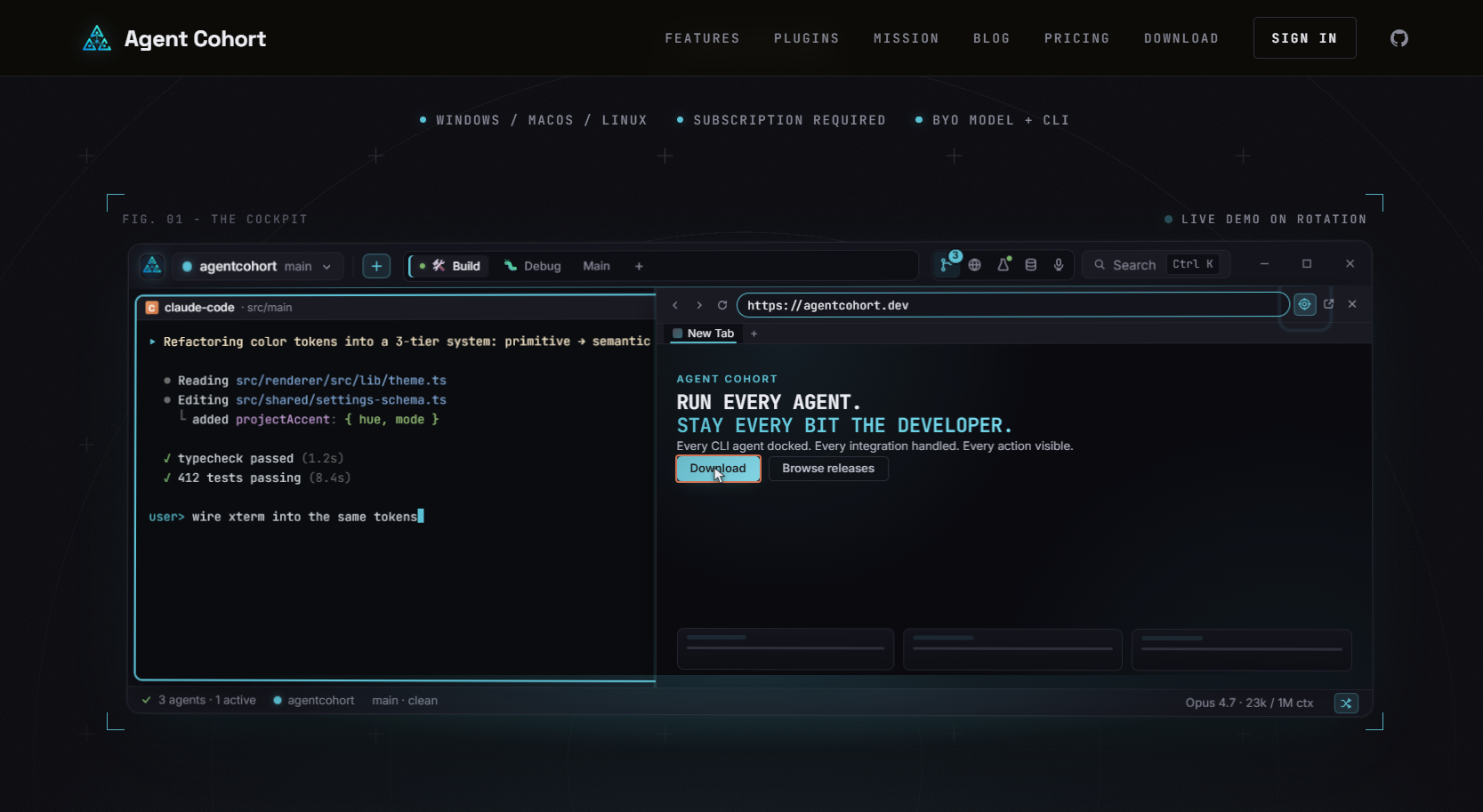
Agentcohort handles installations and authentication automatically, so your team spends time on code, not configuration. Session persistence, customizable layouts, and full visibility into agent actions give team leaders the control they need without adding process overhead. For teams building out their AI agent workflow, Agentcohort is the platform that keeps every agent accountable and every environment reproducible.
FAQ
What is a team coding environment checklist?
A team coding environment checklist is a structured list of standards, tools, and workflows that every developer on a team must follow to produce consistent, deployable code. It covers runtime versions, linting rules, branching policies, CI/CD pipelines, and access governance.
How often should teams update their coding environment checklist?
Teams should review and update their checklist at least quarterly, or whenever a major workflow change occurs such as a new hire wave, a platform migration, or the adoption of a new AI tool.
Which cloud development environment is best for most teams?
GitHub Codespaces is best for teams already using GitHub, offering 60–120 free core hours per month and built-in Copilot integration. Gitpod suits multi-provider teams, and DevPod is the best choice for teams that need full infrastructure control at no licensing cost.
How do you secure AI agents in a team coding environment?
Use ephemeral, disposable containers for every agent task so credentials are never persisted between sessions. Assign scoped service account tokens to agents rather than developer personal access tokens, and log every agent action for review. Teams can also review AI update auditing practices for additional governance frameworks.
What is the difference between standardizing tools and standardizing outputs?
Standardizing tools means requiring every developer to use the same editor and workflow. Standardizing outputs means enforcing consistent linting, formatting, and pipeline behavior regardless of which editor a developer uses. Output standardization is the goal; tool uniformity is not required to achieve it.