title: "Multi-Project Workspace Management for AI Agent Teams" slug: "what-is-multi-project-workspace-management" meta_description: "Everyone's talking about AI coding agents. Nobody's talking about what breaks when you run twelve of them at once. Ben Dol has the scars." author: Ben Dol tags: [multi-agent, developer-tools, workspace-management, CCPM, AI-coding] status: publish
Multi-project workspace management is the practice of consolidating multiple codebases, their environments, and the agents working inside them into a single interface where a human orchestrator can see everything, control what matters, and stay out of the way of everything else. For an engineering lead running AI coding agents today, the immediate first action is this: open your current setup and count how many browser tabs, terminals, and chat windows you need to answer the question "what is every agent doing right now?" If the answer is more than one, you have a workspace problem, not a tooling problem.
- Visibility gap: If you cannot answer "what did agent X do to project Y in the last 30 minutes" in under 10 seconds, your audit surface is already broken.
- Coordination gap: If agents share a senior engineer's review time across projects and that engineer has no queue, you are running CCPM without the buffer tracking.
- Ergonomics gap: If switching context between projects requires closing and reopening terminals, VS Code multi-root workspaces solve this at the IDE level in under five minutes.
The thesis I want to stake early: GENERATION is solved. Verification, orchestration, and resource contention are not.
Table of Contents
- What actually counts as multi-project workspace management?
- Why running multiple AI agents without this breaks fast
- What every multi-project workspace needs technically
- Who does what: human orchestrator versus agent executor
- How to detect and fix resource contention before it kills a sprint
- Concrete patterns for running many agents without losing your mind
- IDE multi-root or dedicated platform: which one do you actually need?
- Why I built Agentcohort the way I did
- Key Takeaways
- Agentcohort: a transparent option for teams past the IDE threshold
What actually counts as multi-project workspace management?
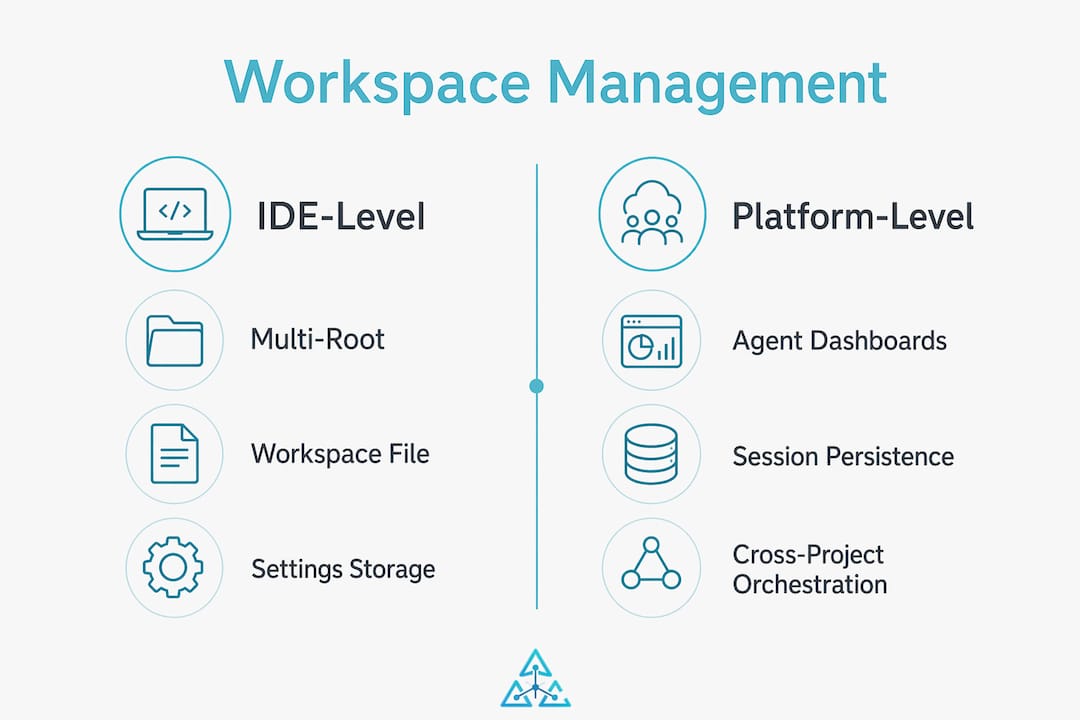
The term covers two distinct layers, and conflating them is where most teams go wrong.
IDE-level: VS Code multi-root workspaces let you add multiple project folders via a .code-workspace file, storing workspace settings, tasks, and cross-root search in one editor instance. IntelliJ IDEA offers a Multi-Project Workspace plugin that lets teams share workspace configs via version control. Multi-terminal grids give each project its own shell without leaving the editor. These are ergonomics wins, fast to set up, and genuinely useful.
Platform-level: This is where agent dashboards, session persistence across restarts, cross-project orchestration, and portfolio-level signals live. A platform-level workspace knows that agent A is blocked on a review from the same senior engineer that agent B is waiting on. An IDE does not.
Out of scope: single-repo CI builds, Jira-style ticket trackers, and general PM tools that have no concept of an agent session or terminal state. Those solve different problems.
Why running multiple AI agents without this breaks fast
The cost is cognitive and flow-based, not just tooling. Every context switch between projects without a unified view costs working memory that does not come back cleanly. Practitioners consistently report that the failure mode is not a crashed agent; it is the slow accumulation of unreviewed changes across three projects simultaneously, none of which individually look alarming.
The operational cost of a poor multi-project workspace is constant status chatter and redundant verification cycles. Teams end up in daily standups that are really just "what did the agents do last night" sessions, which is a $400/hour meeting to answer a question a structured log should answer in seconds.
Here is a realistic failure mode. A team runs four AI coding agents across three microservices. Agent 2 modifies a shared authentication library. Agents 1, 3, and 4 are unaware. Two days later, integration tests fail across all three services. The root cause takes six hours to trace because no workspace-level event log tied the library change to the downstream failures. That is not an AI problem. That is a visibility problem.
What every multi-project workspace needs technically
These are the features worth demanding from any IDE or platform before you scale past two agents.
- Persistent sessions: Agent state, terminal history, and workspace layout survive restarts. Without this, every reboot is a cold start that costs 15 to 30 minutes of re-orientation per agent.
- Per-project agent grids: Each project gets its own terminal pane and agent binding. Agents do not share shells. Cross-contamination of environment variables is a silent killer.
- Auth automation: Per-agent identity, scoped tokens, and secrets handling that does not require a human to paste credentials into a terminal. Manual credential management at scale is both a security risk and a time sink.
- Structured observability: Event logs that include
agent_id,project_id,intent_label,input_hash,output_hash,human_verification_id, andtimestamp. This schema makes rollbacks and audits tractable. Unstructured logs are archaeology, not operations. - Customizable layouts and cross-root search: VS Code groups search results by folder and displays folder-name suffixes for conflicting file names across roots. That detail matters when you are scanning for a function name that exists in four projects.
- Fast context switching: Switching between projects should take one keypress, not a window manager.
Pro Tip: Set up your .code-workspace file with relative paths and commit it to the repo. Every engineer on the team gets an identical multi-root layout on clone, with no manual setup.
Who does what: human orchestrator versus agent executor
Project coordination differs from project management, and in an AI-agent workspace, the distinction is sharper than anywhere else. Agents execute. Humans orchestrate. Mixing those roles is where teams lose control.
The human orchestrator owns goals, memory, policy, and approval gates. The agent owns execution within those gates. The moment an agent starts making prioritization decisions across projects, you have lost the orchestration layer, and you will not notice until something expensive breaks.
The orchestrator's checklist:
- Own the goal definition for each agent, per project, per sprint.
- Set and enforce approval gates before agents touch shared dependencies.
- Maintain the memory layer: what each agent knows, what it does not, and what it should never touch.
- Monitor queue length and buffer consumption, not individual task completion.
The centralized dashboard is not a luxury. It is the instrument panel. An orchestrator flying blind across four projects is not orchestrating; they are hoping.
How to detect and fix resource contention before it kills a sprint
This is where Eliyahu Goldratt's Critical Chain Project Management maps cleanly onto engineering teams. The constrained resource is rarely compute. It is the senior engineer whose review is required before any agent's output ships. When two projects compete for that review time, you need buffer consumption and constrained resource load as first-class signals, not a Slack message.
| Metric | Signal | How to measure | Action when trending bad |
|---|---|---|---|
| Agent utilization | Idle time vs. active time per agent | Terminal session logs | Reassign or pool agents |
| Throughput | PRs merged per agent per week | Git analytics | Check for review bottlenecks |
| Cycle time | Commit to merge, per project | CI/CD pipeline data | Identify approval gate delays |
| Buffer consumption | % of schedule buffer used | CCPM buffer tracking | Escalate or re-prioritize |
| Queue length | Tasks waiting on constrained resource | Orchestrator dashboard | Timebox or preempt |
Platform-level tools that centralize buffer tracking and constrained resource load can surface priority deviations before they become visible in missed deadlines. The alternative is an arbitration meeting, which is just a slower, more expensive version of the same information.
Pro Tip: When a senior engineer becomes the constraint across two projects, implement soft preemption: timebox their review slots per project (e.g., 90 minutes on Project A, then forced switch to Project B) rather than letting the loudest stakeholder win the queue.
Concrete patterns for running many agents without losing your mind
Four operational patterns that actually hold up at scale:
- Purpose-bound agents: Each agent has one declared role per project (code generation, test writing, documentation). No agent crosses roles without an explicit reassignment logged in the orchestrator dashboard.
- Ephemeral sandbox agents: For exploratory or risky tasks, spin agents in isolated environments with no write access to production branches. Destroy the sandbox after review.
- Pinned-review agents: One agent per project whose sole job is to review other agents' outputs before they hit the shared codebase. This decouples velocity from quality gates.
- Conveyor-agent pipelines: Chain agents sequentially: generate, test, lint, review. Each stage gates the next. No human intervention required until the final approval gate.
A minimal log schema for any agent action: timestamp | event_type | agent_id | project_id | outcome. Example: 2026-03-14T09:12:00Z | file_modified | agent-codex-3 | auth-service | success. That one line makes a rollback conversation take two minutes instead of two hours.
Pro Tip: Lightweight review gates beat heavyweight approval processes every time. Require a human sign-off only on changes to shared dependencies or security-sensitive files. Everything else can ship through the pinned-review agent.
IDE multi-root or dedicated platform: which one do you actually need?
IDE-based multi-root setups buy developer ergonomics fast. IntelliJ workspaces can be committed to a repo for team-wide sharing. VS Code .code-workspace files handle cross-root search and per-root settings in minutes. For a team running two to three agents across two projects, this is probably enough.
The top project management software comparisons consistently show that platform-level capabilities become necessary when shared constrained resources appear: a senior engineer whose time is split, a licensed tool with limited seats, or a compliance requirement that demands audit logs across all agent actions simultaneously.
Decision criteria:
- Fewer than 4 agents, 2 projects, no shared constrained resources: IDE multi-root is sufficient.
- 4 or more agents, shared senior reviewer, compliance requirements: You need a platform with session persistence, cross-project orchestration, and structured audit logs.
- Crossing the CCPM threshold: When buffer consumption becomes a real signal rather than a metaphor, an IDE cannot surface it. A platform can.
The first-person account of scaling 13 AI agents makes this concrete: the IDE held up through agent 4. After that, the lack of cross-project visibility created exactly the kind of silent failure mode described earlier.
Why I built Agentcohort the way I did
I want to be direct: I am biased. I built Agentcohort. Everything I describe below is a feature I added because I personally got burned by its absence.
The first time I ran six AI coding agents across four projects simultaneously, I spent more time managing the agents than the agents saved me. That is not a productivity tool. That is a second job.
The multi-terminal grid came from the scar of having 14 terminal windows open and no idea which one belonged to which project. Session persistence came from losing three hours of agent context after a laptop restart. Auth automation came from pasting API keys into terminals at 11 PM because an agent had silently expired its token. Per-project agent bindings came from an agent modifying the wrong service because I had not isolated its scope.
Agentcohort integrates Claude Code and OpenAI Codex into a single workspace with those features built in. It is not the only way to solve this. You can build your own orchestration layer with tmux, a structured log pipeline, and a custom dashboard. I did that first. It took three months and broke twice. Agentcohort is what I wished existed before I built it.
If you are running fewer than four agents and your projects do not share constrained resources, the DIY path is reasonable. If you are past that threshold, the build cost is probably not worth it.
Key Takeaways
Multi-project workspace management for AI agent teams requires structured observability, human orchestration of goals and approval gates, and CCPM-style buffer tracking once shared constrained resources appear.
| Point | Details |
|---|---|
| Visibility is the first fix | If you cannot answer "what did each agent do in the last 30 minutes" in under 10 seconds, add structured logs before anything else. |
| Orchestrator owns the gates | Humans set goals, memory, and approval gates; agents execute within them. Never let agents make cross-project prioritization decisions. |
| CCPM signals beat politics | Track buffer consumption and constrained resource load to replace stakeholder pressure with data when prioritizing across projects. |
| IDE vs. platform threshold | Multi-root workspaces suffice for 2 to 3 agents; a dedicated platform becomes necessary once shared constrained resources appear. |
| Agentcohort as one option | Agentcohort provides multi-terminal grids, session persistence, and auth automation for teams past the IDE threshold, built from direct operational scars. |
Agentcohort: a transparent option for teams past the IDE threshold
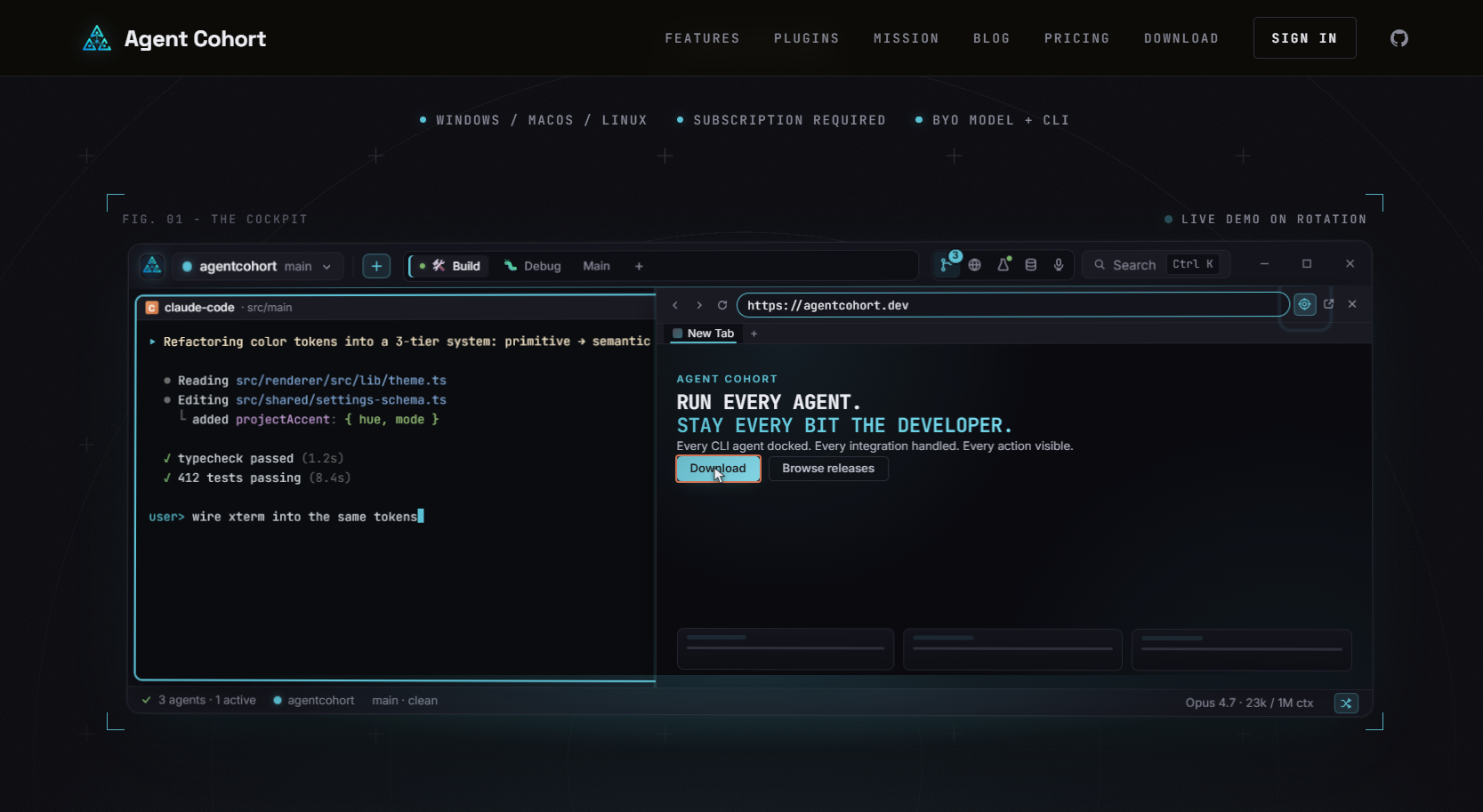
If the problems described here sound familiar, specifically the status chatter, the lost agent sessions, the credential management at midnight, Agentcohort is worth a look. It is not a generic project management tool. It is a developer command deck for AI agents: multi-terminal grids, session persistence across restarts, auth automation, and per-project agent bindings in one interface.
I built it because the DIY version cost me three months and broke under load. That said, if you are running a small agent fleet and have the engineering bandwidth to wire together tmux, structured logging, and a custom dashboard, do it. The concepts in this article apply regardless of what you run them on.
If you want to skip the build and start with something that already has the scars baked in, try Agentcohort and see whether the workspace fits your team's scale.
The quotable version of everything above: if your agents are generating faster than you can verify, you do not have an AI problem, you have an orchestration problem.